


Finding Moisture in Soil In LCD Display with Arduino Uno

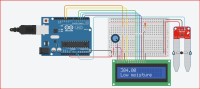
Finding Moisture in Soil In LCD Display with Arduino Uno
Note this project should not be copied without my permission.
//Included Libraries

#include

//MACROS are defined here

const int resetPin = 12;

const int enablePin = 11;

const int d4 = 5;

const int d5 = 4;

const int d6 = 3;

const int d7 = 2;

LiquidCrystal lcd16x2(resetPin, enablePin, d4, d5, d6, d7);

//Gloabl Variables are declared here

float Soil_Mositure;

void setup() {

	//put your setup code here, to run once:

	Serial.begin(9600);

	lcd16x2.begin(16, 2);

	pinMode(A0, INPUT);


}

void loop() {

	//put your main code here, to run repeatedly:


	Soil_Mositure = analogRead(A0);

	lcd16x2.setCursor(1 - 1, 1 - 1);

	lcd16x2.print(Soil_Mositure);

	Serial.println(Soil_Mositure);

	if(((395.5 < Soil_Mositure) && (600 > Soil_Mositure))) {

		lcd16x2.setCursor(1 - 1, 2 - 1);

		lcd16x2.print("Medium Moisture");

	}

	else {

		if(((601 < Soil_Mositure) && (1500 > Soil_Mositure))) {

			lcd16x2.setCursor(1 - 1, 2 - 1);

			lcd16x2.print("High Moisture");

		}

		else {

			if(((0 < Soil_Mositure) && (100 > Soil_Mositure))) {

				lcd16x2.setCursor(1 - 1, 2 - 1);

				lcd16x2.print("VeryLowMoisture");

			}

			else {

				if(((101 < Soil_Mositure) && (354 > Soil_Mositure))) {

					lcd16x2.setCursor(1 - 1, 2 - 1);

					lcd16x2.print("Low moisture");

				}

				else {

					if((Soil_Mositure == 0)) {

						lcd16x2.setCursor(1 - 1, 2 - 1);

						lcd16x2.print("No moisture");

					}

				}

			}

		}

	}

	delay(0.1 * 1000);

	lcd16x2.clear();

}
Want to build a project?
Bring your design to life with the Elektor PCB Service, powered by Eurocircuits. Upload the project files and order professionally manufactured PCBs or assembled boards through a proven European production platform.
Supporting KiCad, Eagle, Gerber, and ODB++ formats, the service is suitable for everything from prototypes and validation builds to series production and volume manufacturing.
Made in Europe. Fast. Reliable. Professional.
Discussion (1 comment)