


Franzis-UKW-Radio Wavy mit Touch-Sensor-Tasten

This radio module from Franzis can be easily controlled with touch buttons, which makes operation a bit more futuristic.
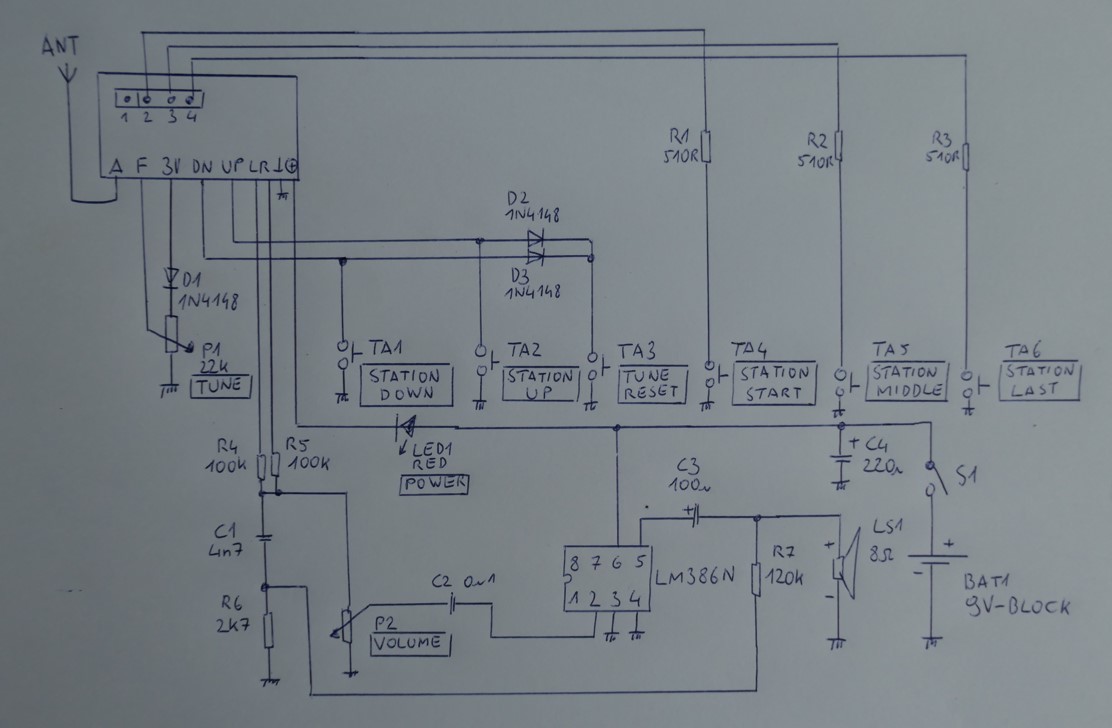
The radio now has five touch modules, which must be inverted using a solder bridge. Only the RESET button remains with a button, as the touch modules require a warm-up time. I got the touch modules quite cheaply years ago, and now they're being used. They look really good, and the operation is becoming more futuristic. If you look at my circuit diagram, you'll quickly notice that it uses one button, one potentiometer, five touch modules, and four additional diodes, which are important for the circuit.

TOUCH1: STATION DOWN, scans and selects stations downwards
TOUCH2: STATION UP, scans and selects stations upwards
TOUCH3: STATION START, first station in memory
TOUCH4: STATION MIDDLE, second station in memory
TOUCH5: STATION LAST, third station in memory
S1: TUNE RESET, clears the station memory
P1: VOLUME, volume S2: POWER, power switch
Initial station memory programming:
1. Press and hold S1.
2. Turn on the radio.
3. Release S1; the radio will beep briefly.
4. Turn off the radio.
5. Turn on the radio after 3 seconds.
6. Start the station search with TOUCH1 or TOUCH2.
7. By holding down TOUCH1 or TOUCH2, a station can be saved; a beep will sound to confirm this.
8. Several stations can be saved in the same way.
9. After selecting a station, turn off the radio for 3 seconds. Then, by tapping TOUCH1 or TOUCH2, you can select the station.
Easter eggs: Special features when selecting stations. TOUCH3 to TOUCH5 can be used to select the station in memory.
In order to use the touch modules mentioned above for this circuit, they must be modified. This is done simply by soldering a bridge, see photos.


The radio's sound quality could also be improved, as I discovered during the initial setup. A simple, adjustable low-pass filter is sufficient for this.
Want to build a project?
Bring your design to life with the Elektor PCB Service, powered by Eurocircuits. Upload the project files and order professionally manufactured PCBs or assembled boards through a proven European production platform.
Supporting KiCad, Eagle, Gerber, and ODB++ formats, the service is suitable for everything from prototypes and validation builds to series production and volume manufacturing.
Made in Europe. Fast. Reliable. Professional.
Discussion (0 comments)