Read about my journey with a modern radar sensor, the Acconeer A121, which can detect everything from tiny movements to speed and distance; with a few tips to get started.
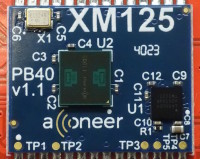
Recently, I explored the A121 radar sensor from Acconeer, a compact and powerful device that caught my attention during research for a mailbox notifier project. You’ll be able to read about that in detail in the July 2025 issue of Elektor, here (Note: the link won’t work until July). There are several kinds of radar sensors… The HB100 featured in Elektor is a continuous-wave (CW) radar, which can’t measure distance; only speed of moving objects can be measured. In contrast, the A121 is a Pulsed Coherent Radar operating at 60 GHz with exceptional distance resolution (about 0.1 mm!) thanks to picosecond-scale time measurements. While the high operating frequency and the high resolution make some interesting measurements possible (material detection, breathing monitoring, etc), the sensor’s complexity and BGA packaging make it a bit difficult to use. Acconeer addresses this the XM125 module, integrating the A121 sensor and an STM32 microcontroller into a more accessible form factor.
Acconeer also offers a development kit with direct USB-C connection to the PC, but it’s a bit on the expensive side. The XM125 breakout board from SparkFun does the same at a lower price. Acconeer’s software support includes SDKs for various applications and a Python-based Exploration Tool, which is great to try out the sensor’s features. I’ll explain the installation of the Exploration Tool and the firmware flashing process. Once connected to your XM125 module through a serial port, you can access different measurement modes like presence, speed, vibration detection, etc. The interface is detailed, with preset configurations, settings panels, and measurement displays!
The article also details a few difficulties and bugs I encountered along the way, such as hardware flow control issues with the serial port. I tried using other models of USB to UART converters instead of the CH340C, such as the CP2102 from Silicon Labs or the FT232RL from FTDI for better data throughput. Of course the article also discusses the several ways of using the sensor, with regard to software, either using the libraries provided by Acconeer, or the STM32Cube IDE from ST.
Although I didn’t find a direct application for the sensor at home yet, I found the learning experience very rewarding. Tinkering with the Exploration Tool settings and reviewing the available software libraries are recommended for deeper understanding! Tell us your thoughts about this sensor if you’ve ever used it, or similar sensors in your own projects. Feel free to comment on the article when it’s out too! Have fun :)
Want to build a project?
Bring your design to life with the Elektor PCB Service, powered by Eurocircuits. Upload the project files and order professionally manufactured PCBs or assembled boards through a proven European production platform.
Supporting KiCad, Eagle, Gerber, and ODB++ formats, the service is suitable for everything from prototypes and validation builds to series production and volume manufacturing.





Discussion (0 comments)