Arduino UNO R4: A Strong Middleweight Between the R3 and the New Arduino UNO Q
The Arduino UNO R4 brought a modern 32-bit platform to the classic UNO form factor, adding higher voltage tolerance, USB-C, a Renesas RA4M1 MCU, and a long list of robustness upgrades. The WiFi variant added an ESP32-S3 co-processor, built-in LED matrix, Bluetooth, and easier debugging. Watch the full discussion with Alessandro to see the new features explained.
With the arrival of the Arduino UNO Q, it’s useful to remind readers what the UNO R4 brought to the table and why many projects may still favour it over the Q or the classic R3.
The R4 kept the traditional UNO form factor and full 5 V I/O compatibility, which is a hard requirement for countless shields and legacy designs. At the same time it upgraded the internals to a 32-bit Renesas RA4M1, expanded RAM and flash, added USB-C, improved power handling, and modernized the peripherals — all without breaking the 5 V ecosystem.
The R3 remains the simplest option for AVR-based workflows and ultra-low-level tinkering, while the UNO Q moves into a different class entirely with its 3.3 V Qualcomm platform, wireless features, and higher-level compute.
Alessandro Ranellucci from Arduino explained the design decisions and strong points in favor of the two R4 variants: UNO R4 Minima and UNO R4 WiFi.
The Arduino UNO R4 Family
The UNO R4 replaces the long-running 8-bit AVR with a 32-bit Renesas RA4M1 microcontroller. This keeps the board fully 5 V-compatible , so existing shields and tutorials remain usable, while adding features the original UNO never had. The RA4M1 brings a DAC, op-amp, comparator, CAN bus, HID support, and significantly more processing headroom for modern projects.
Robustness was a central theme in the redesign. The R4 family includes extensive protection diodes, improved thermal behaviour, and a wide input range up to 24 V on VIN and the barrel jack, making it easier to power motors and the board from a single supply. USB-C replaces the legacy connector, and the Arduino IDE recognises the boards without extra drivers. Arduino has also worked with library authors so that most existing libraries run on the UNO R4, with only a small number still being ported.
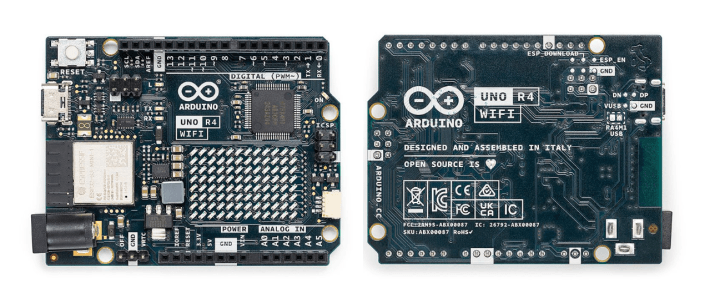
The Arduino UNO R4 WiFi builds on the Minima with:
• An ESP32-S3 co-processor for Wi-Fi and Bluetooth Low Energy
• A 96-pixel addressable LED matrix on the board
• A Qwiic connector for I²C expansion
• Integrated debugging over USB
The LED matrix is charlieplexed directly from the microcontroller pins. Arduino provides a dedicated library plus a browser-based tool that lets users draw icons and animations on a grid and export them as Arduino code.
The Arduino UNO R4 WiFi
Hardware Debugging Upgraded
Debugging support has moved beyond the traditional Serial.print() approach. Both boards support hardware debugging, with an SWD header on the Minima and USB-based debugging on the WiFi model. The UNO R4 WiFi also includes a fatal-error catcher that prints a stack trace to the Serial Monitor before the board halts, giving beginners a clearer indication of where and why their code crashed.
For the full technical discussion and context from Arduino’s side, watch the video above.
Subscribe
Tag alert: Subscribe to the tag Arduino and you will receive an e-mail as soon as a new item about it is published on our website!
Read full article
Hide full article
About Brian Tristam Williams
Brian Tristam Williams is a content creator who’s had a passion for computers and electronics since he got a “microcomputer” at age 10. He bought his first Elektor Magazine at 16, and has been orbiting the electronics and computers ecosystem since. He first co... >>





Discussion (0 comments)