


ultrasonic sensor value in lcd display with arduino

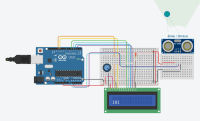
ultrasonic sensor value in LCD display with Arduino
code:
// C++ code // include the library code: #includeby mohamed hashir// initialize the library with the numbers of the interface pins LiquidCrystal lcd(12, 11, 5, 4, 3, 2); int ultrasonic = 0; long readUltrasonicDistance(int triggerPin, int echoPin) { pinMode(triggerPin, OUTPUT); // Clear the trigger digitalWrite(triggerPin, LOW); delayMicroseconds(2); // Sets the trigger pin to HIGH state for 10 microseconds digitalWrite(triggerPin, HIGH); delayMicroseconds(10); digitalWrite(triggerPin, LOW); pinMode(echoPin, INPUT); // Reads the echo pin, and returns the sound wave travel time in microseconds return pulseIn(echoPin, HIGH); } void setup() { lcd.begin(16, 2); } void loop() { ultrasonic = 0.01723 * readUltrasonicDistance(A0, A1); lcd.setCursor(0, 1); // print the number of seconds since reset: lcd.print(ultrasonic); delayMicroseconds(100); }
Want to build a project?
Bring your design to life with the Elektor PCB Service, powered by Eurocircuits. Upload the project files and order professionally manufactured PCBs or assembled boards through a proven European production platform.
Supporting KiCad, Eagle, Gerber, and ODB++ formats, the service is suitable for everything from prototypes and validation builds to series production and volume manufacturing.
Made in Europe. Fast. Reliable. Professional.
Discussion (0 comments)